Creating an anime character in 3D no longer has to begin with a blank scene in Blender, Maya, or ZBrush. Depending on the tool, you can start with an illustration, a concept image, a selfie, or a text prompt. The result might be a 3D-looking render, or it might be a mesh you can open in Blender, animate, or send to a printer. Those are very different outcomes.
When you are looking for an anime 3d character creator, check the output before anything else. Hi3D, Meshy, and 3D AI Studio generate geometry. VRoid is built around editing an anime avatar. Canva and Visme can make a convincing 3D-style character image, but the file is still a flat visual asset.
We compared seven popular options by looking at anime fit, real 3D output, export compatibility, rigging, animation, free access, and what happens after generation. We also ran a hands-on Hi3D V3.0 test with a 2D anime character, including a look at the parts the reference image never showed.
7 Best 3D Character Creators Compared
Before choosing a 3d anime character creator, check the export format first. A PNG, VRM avatar, and FBX mesh may all look “3D” in a product demo, but they are not interchangeable. The format determines what you can actually do with the character afterward.
| Tool | Best For | Real 3D Mesh | Blender / Unity / Unreal | Rigging / Animation | VRM / VRChat | Free Export | 3D Printing |
|---|---|---|---|---|---|---|---|
| Hi3D | Turning anime images into high-detail 3D models | Yes | Yes, via GLB/FBX/OBJ | No dedicated auto-rigging confirmed | No native VRM confirmed | Free start; limits depend on credits/plan | Yes |
| VRoid Studio | Manually creating anime avatars | Yes | Yes, via VRM-compatible workflows | Yes | VRM 0.0/1.0; VRChat workflow | Yes | Limited / pixivFACTORY workflow |
| 3D AI Studio | Multi-model AI 3D generation | Yes | Yes, including BLEND/FBX/GLB | Yes, platform includes rig/animation tools | No native VRM confirmed | Free credits; full export access is plan-dependent | Yes, via STL/3MF |
| Canva | Fast 3D-style character images | No | No editable mesh | No 3D rig | No | Free image export with limited AI uses | No |
| Avaturn | Selfie-to-avatar and app/game avatars | Yes | Yes | Humanoid rig, blendshapes, visemes | VTubing compatible; no native VRM confirmed | Basic integration/export available; API is paid | Not a core workflow |
| Visme | Animated characters for presentations | No | No editable mesh | Preset character animation only | No | Plan-dependent media export | No |
| Meshy AI | AI 3D assets, rigging and game workflows | Yes | Yes | Auto-rigging + animation | No | Limited free downloads | Yes |
1. Hi3D: Best for Turning Anime Images Into High-Detail 3D Models
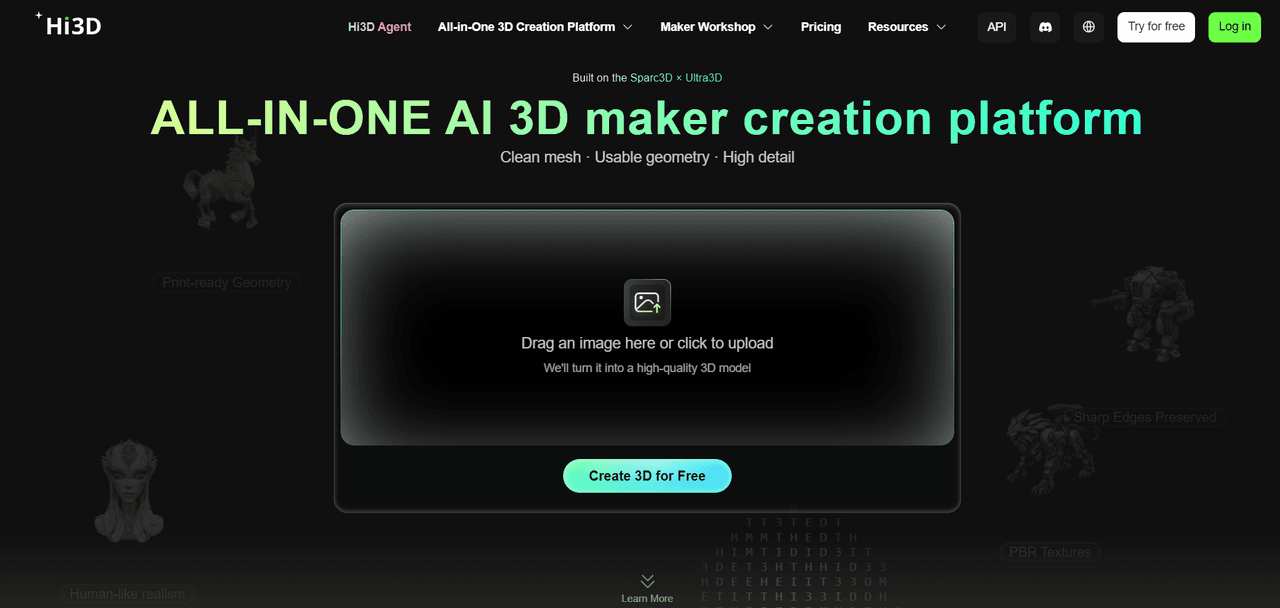
Hi3D is a practical choice if you already have anime artwork and want to turn it into a 3D model. You bring the character design; the tool handles the first pass at the mesh.
Hi3D starts with image-to-3D generation, but V3.0 covers more than the first mesh. The same workspace includes multi-view generation, model export, stylized texturing, 3D relief, Split-to-print, and Multi-color print. You can take finished 2D artwork through generation, inspection, export, and physical production without moving between several unrelated tools. For a 3d anime character creator that starts with finished artwork, that is a shorter route than rebuilding the character by hand in an avatar editor.
Hi3D V3.0 supports 2048quality and 2048master modes, with exports including OBJ, GLB, STL, FBX, USDZ, and 3MF. In practice, the Master mode is aimed at dense, highly textured results: our test reached roughly 4.99 million faces before any cleanup or retopology.
Our Hi3D V3.0 Master Test
For this article, we used an anime-style full-body illustration and generated it with Hi3D V3.0 Master.
In our run, the full-body anime illustration produced a model with roughly 4.99 million faces, about 2.55 million vertices, and an 8192 × 8192 texture UV. The interface showed V3.0 Master at 2048 resolution. For a single reference image, that is a dense output, and the file is already quite heavy before any cleanup or retopology.
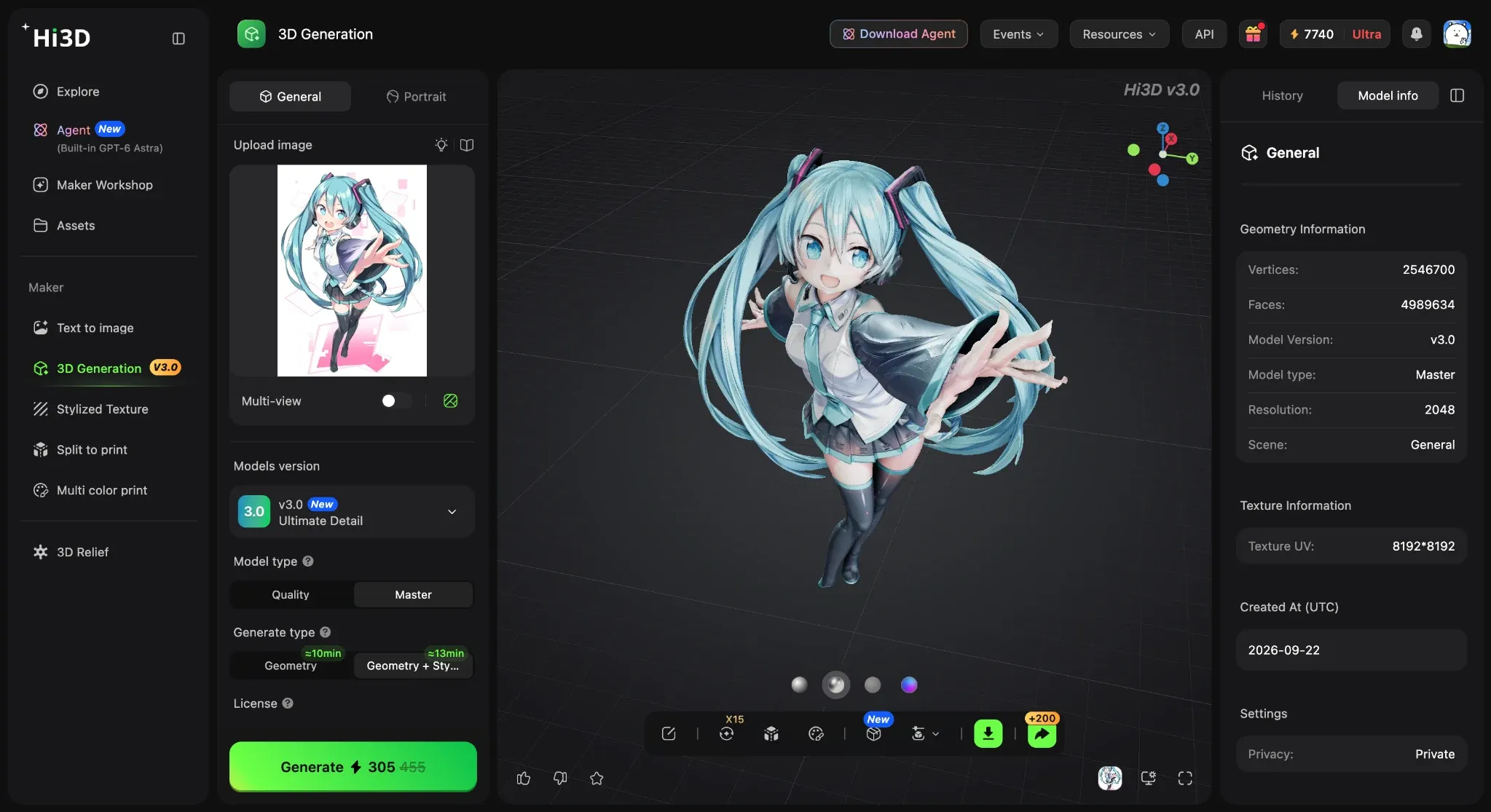
Hi3D V3.0 Master test showing the original anime reference, generated model, and model information.
The reference had long twin tails, extended fingers, wide sleeves, overlapping clothing, and a dynamic pose. From the front, Hi3D kept the silhouette and clothing folds surprisingly well. The hair did not collapse into a single mass, and the pose remained readable.
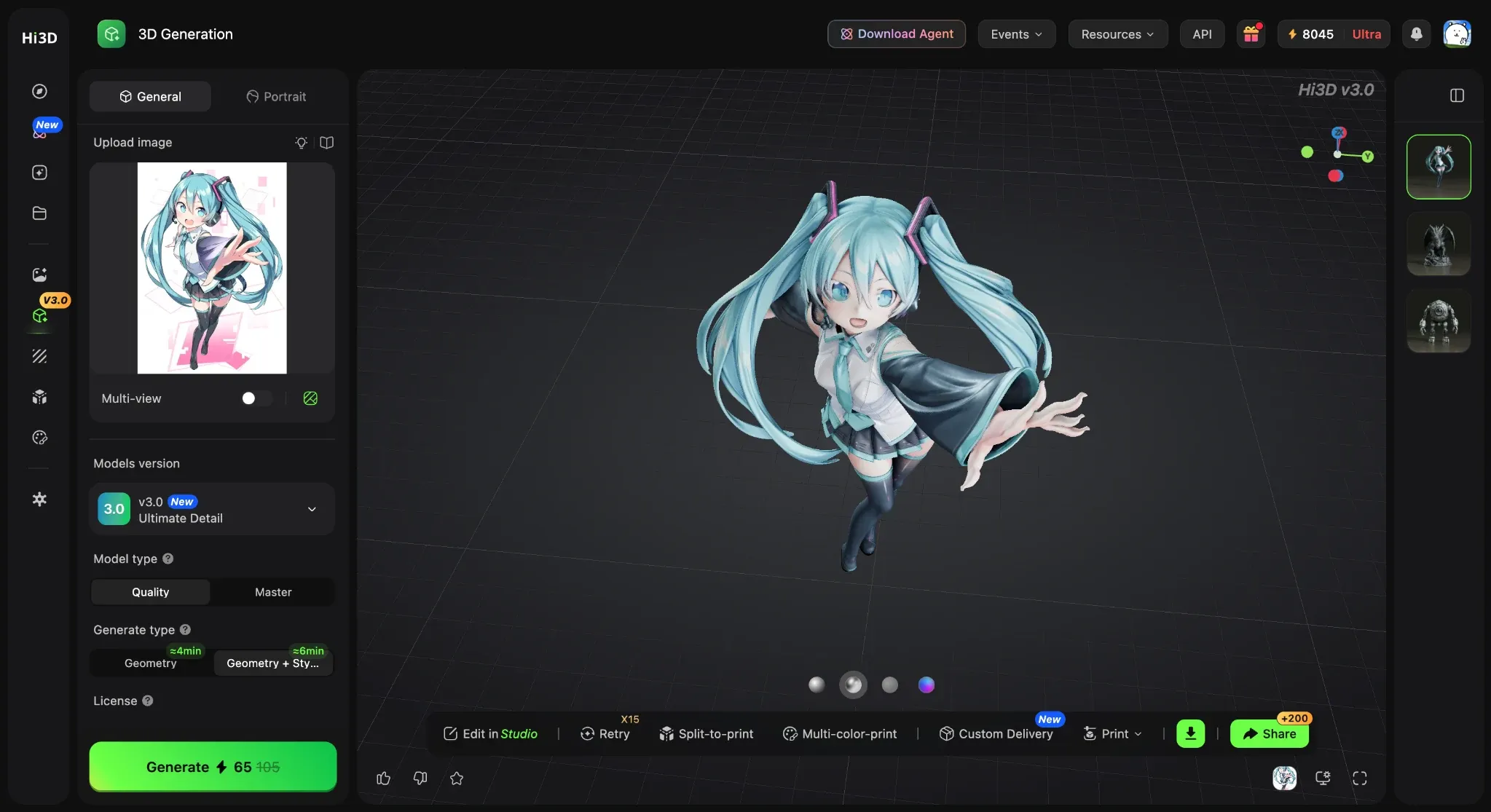
Front view of the anime character generated from the original 2D illustration.
The rear view was the more revealing test. The source image provided almost no direct information about the character's back, yet the generated model still formed a recognizable rear silhouette, hair volume, and basic clothing structure. The weak spots were the expected ones: occluded areas beneath the sleeves and layered skirt came out fused and would need manual cleanup before rigging or close-up rendering.
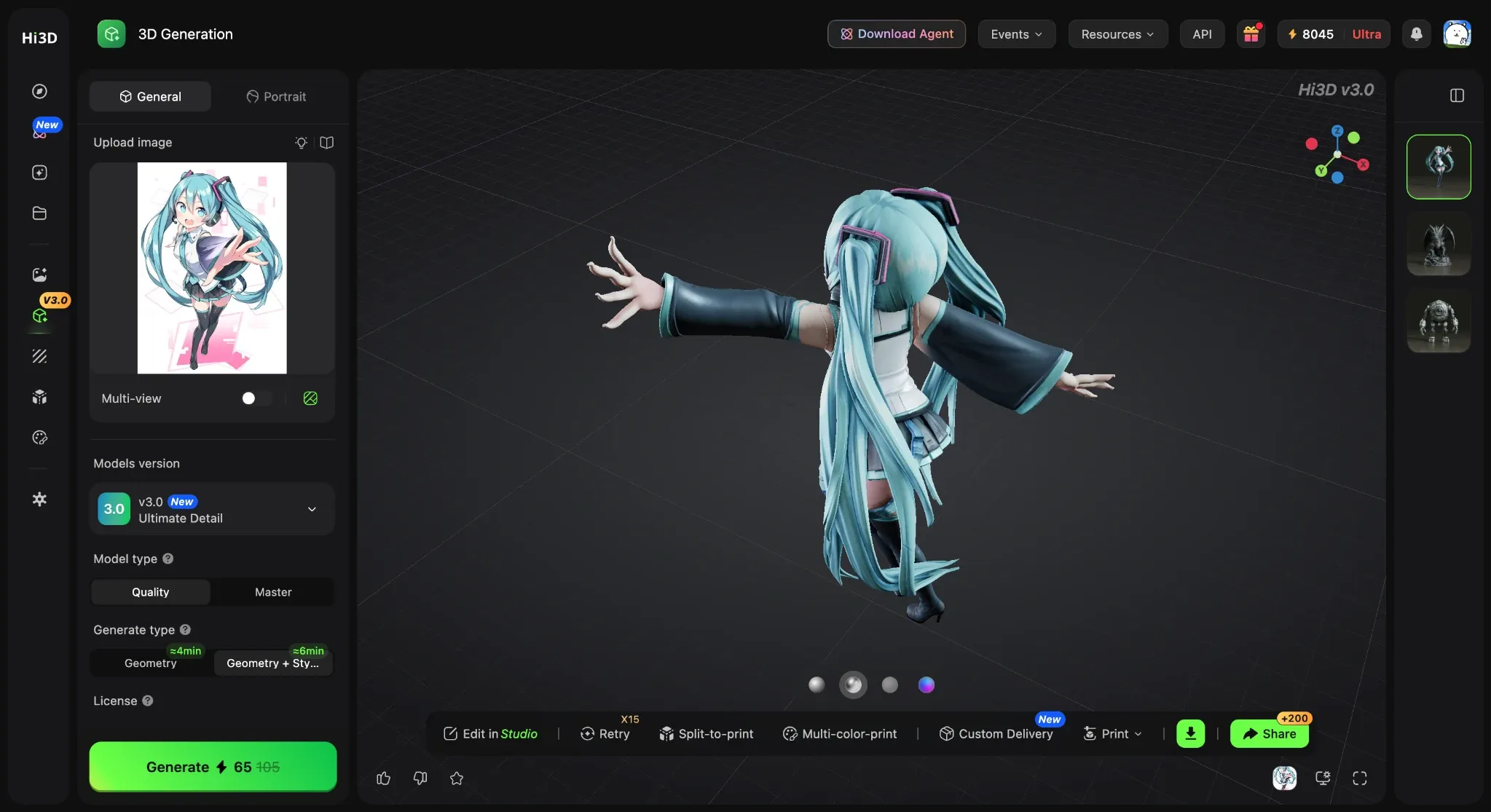
Rear view used to inspect how Hi3D reconstructed areas not visible in the source image.
- Treat the result as a starting mesh rather than a production-ready asset. Inspect hidden and overlapping areas in Blender, and use multi-view references when rear-side accuracy matters.
Main Features:
- V3.0 image-to-3D and multi-view generation, including 2048quality and - 2048master modes for higher-detail outputs.
- High-resolution textured model generation and export in common formats including OBJ, GLB, STL, FBX, USDZ, and 3MF.
- One place for generation and cleanup, with model inspection, stylized texturing, and 3D relief tools alongside the original conversion.
- Print-oriented tools for splitting complex models into parts and preparing multi-color output.
- Works entirely in the browser, so you can generate the model first, then move it into Blender, export it, or prepare it for printing.
You can try the current Hi3D Image-to-3D tool directly on the site. The print tools are useful once the model has survived a basic inspection.
Price and Free Access
Hi3D has a Free plan at $0. Pro costs $19.90 per month, or $119.40 per year when billed annually ($9.95/month equivalent). Max costs $39.90 per month, or $239.40 per year ($19.95/month equivalent). Ultra costs $129.90 per month, or $779.40 per year ($64.95/month equivalent). Generation modes, resolutions, credits, and usage limits depend on the active plan, so users planning repeated Master generations should check the credit cost before starting a batch.
Pros:
- Generates real 3D geometry instead of a flat 3D-style image
- Well suited to existing anime illustrations and character concepts
- Strong front-to-back reconstruction in our test
- Supports common 3D export formats
- Includes dedicated 3D-print preparation tools
- Easier to start with than traditional manual character modeling
Cons:
- Hidden geometry from a single image is still AI-inferred
- Master generation requires more time and credits than lower-detail modes
- No dedicated native auto-rigging tool is included in the core generation process
- Professional animation may still require retopology and rigging elsewhere
- Hands, hair intersections, and thin elements should be inspected manually
Best For
Hi3D is a good fit if you already have a 2D anime character waiting in a folder and need a workable 3D starting point.
If you already have finished anime artwork and want to test image-to-3D before learning Blender, Hi3D is one of the easier places to start.
2. VRoid Studio: Best for Manually Designing Anime Avatars
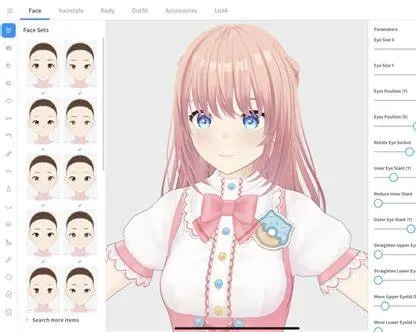
VRoid Studio is an editor first. You build the character through controls for facial features, hair, body proportions, clothing, textures, and avatar setup; it is not trying to infer a mesh from an existing illustration.
It is a natural choice when VRM matters. VRoid supports VRM 0.0 and VRM 1.0 export, and its newer dress-up tools include a VRChat-compatible export path. For anyone looking for a 3d anime character creator free, it is easier to recommend than an image-to-3D tool when avatar compatibility comes first.
Main Features:
- Anime-style avatar creation with controls for facial features, body proportions, hair, clothing, and textures.
- Hair and clothing editing tools for building a character around a consistent visual style.
- VRM 0.0 and VRM 1.0 export for avatar platforms and VTuber projects.
- A VRChat-compatible export path through the newer dress-up tools.
- You can keep adjusting the character by hand instead of asking the software to infer it from one image.
Price:
VRoid Studio is a free desktop application, and there is no monthly or annual subscription for the core editor. VRM export is included. The separate iPad app and VRoid Plus subscription are priced separately by region and platform.
Pros:
- Built specifically around anime-style characters
- Strong VRM and avatar ecosystem support
- High degree of visual control
- No subscription required for the core editor
- Suitable for VTuber and VRM projects
Cons:
- Not an automatic image-to-3D converter
- Recreating an existing illustration can take time
- Less suitable for monsters, props, or unusual body structures
- Blender or Unity projects usually rely on VRM-compatible importers or conversion tools
Best For
Users who want to manually build an original anime avatar, VTuber model, VRM character, or reusable stylized character for avatar ecosystems.
3. 3D AI Studio: Best for Multi-Model AI 3D Tools
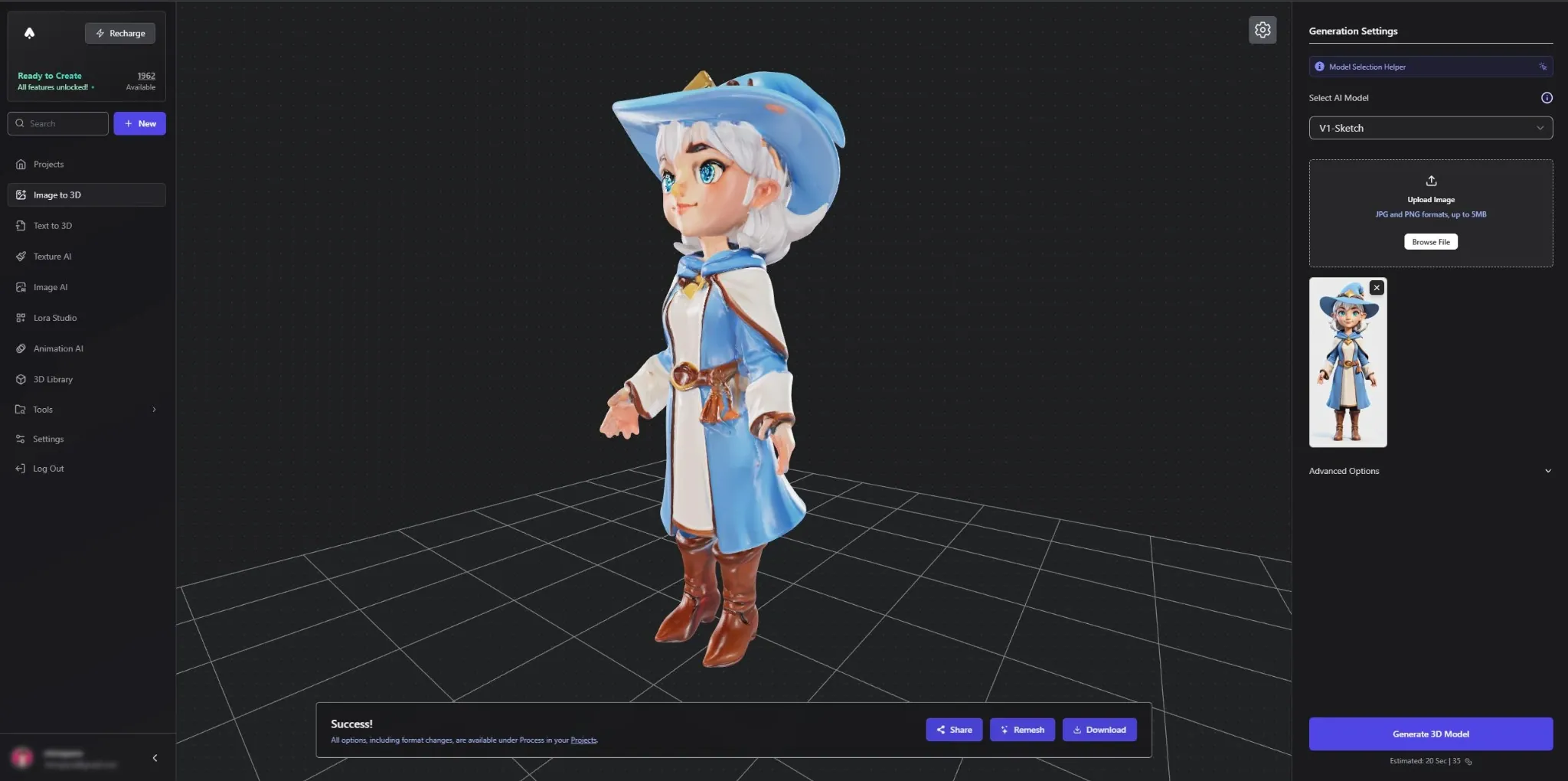
3D AI Studio puts image-to-3D, text-to-3D, AI texturing, remeshing, image generation, format conversion, and several AI models in one place. It is useful when you want to compare generation methods or keep working on the asset after the first result.
3D AI Studio supports FBX, GLB, OBJ, STL, 3MF, USDZ, and BLEND export for Blender, Unity, Unreal Engine, and 3D printing. It also includes rigging and animation tools.
Main Features:
- Image-to-3D and text-to-3D generation with several AI model choices inside one interface.
- AI image generation, texturing, remeshing, and format conversion when a first-pass mesh is not enough.
- Rigging and animation tools for taking generated assets further inside the same platform.
- FBX, GLB, OBJ, STL, 3MF, USDZ, and BLEND export for Blender, Unity, Unreal, and printing.
- You can compare models in one account instead of committing to a single generation method from the start.
Price and Free Access
3D AI Studio offers a free tier with starter credits. Its Basic plan costs $19 per month or $144 per year ($12/month equivalent), Studio costs $29 per month or $276 per year ($23/month equivalent), and Pro costs $149 per month or $1,668 per year ($139/month equivalent). Paid plans unlock more generations, premium models, and broader export access.
Pros:
- Multiple AI models in one interface
- Direct compatibility with Blender and major game-engine formats
- Good range of supporting production tools
- Suitable for users who want control over model selection
Cons:
- More complex than a single-model tool
- Credit use varies by model and tool
- Free credits do not necessarily mean unrestricted free export across every model or feature
Best For
3D artists and advanced creators who want to compare several generation models and continue assets into Blender, Unity, Unreal, or printing.
4. Canva: Best for Quick 3D-Style Anime Character Images
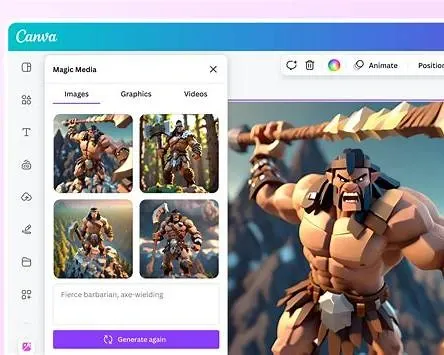
Canva shows up for “3D character creator” searches, but do not expect a mesh. Its output is an image that looks 3D, not a character you can open and rotate in Blender.
Canva generates a 3D-style character image from a prompt and lets you continue editing it inside Canva. You can download the result as a PNG or JPG, so Canva works as a 3d character creator anime option for visual content rather than a true mesh-generation tool.
Main Features:
- Text-to-character generation with 3D-rendered visual styles, pose prompts, and appearance controls.
- Built-in image editing for adjusting the generated character without opening a 3D package.
- PNG and JPG output rather than an editable mesh.
- Social, presentation, and marketing templates for turning the character into finished content.
- You get a quick 3D-looking image, not a model for Blender or printing.
Price:
Canva has a Free plan at $0. Canva Pro costs US$14.99 per month or US$144 per year for one person. For teams, Canva Business costs US$250 per year per person. AI usage and some export features vary by plan, region, and billing surface.
Pros:
- Extremely easy to use
- No 3D skills required
- Good for concept art and visual content
- Free users can try the character generator
Cons:
- Does not export an editable 3D mesh
- Cannot be used directly for Blender, Unity, Unreal, VRM, or 3D printing
- Not a rigging or animation tool
Best For
Designers, marketers, students, and creators who need the appearance of a 3D anime character rather than an actual 3D model.
5. Avaturn: Best for Turning a Selfie Into an Animation-Ready Avatar
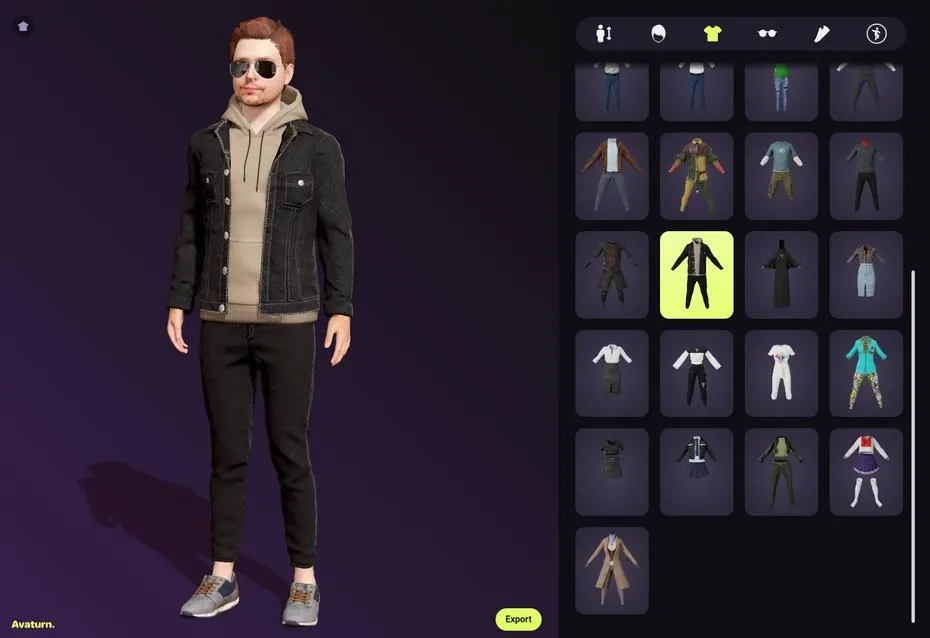
Avaturn focuses on turning a real person into a customizable 3D avatar.
Avaturn avatars export in GLB format and can be used in Blender, Unity, Unreal Engine, Maya, Cinema 4D, and other 3D environments. They include a standard humanoid body rig, and supported avatar types can include ARKit blendshapes and visemes for facial animation.
Main Features:
- Selfie-to-avatar creation with body, face, and appearance customization.
- GLB export plus a standard humanoid body rig for use in other 3D software.
- ARKit blendshapes and visemes on supported avatar types for facial animation and VTubing.
- Unity and Unreal integration for apps, games, and virtual spaces.
- It is built around reusable human avatars rather than illustrated anime reconstruction.
Price and Free Access
Avatar creation and basic export are available to try without a paid monthly plan. For developer integrations, Avaturn's Pro plan costs $800 per month and includes up to 1,000 avatars per month; additional avatars cost $0.15 each. Enterprise pricing is custom. This is an integration plan rather than a normal subscription for occasional avatar creation.
Pros:
- Fast avatar creation from a selfie
- Animation-ready humanoid structure
- Unity and Unreal integration
- Useful for apps, games, virtual spaces, and interactive experiences
Cons:
- Focused more on human avatars than anime artwork
- Does not natively target illustrated anime character reconstruction
- No native VRM export is included in the current public workflow
Best For
Developers and users who want to turn real people into avatars for games, apps, virtual spaces, or interactive experiences.
6. Visme: Best for Animated 3D Characters in Presentations
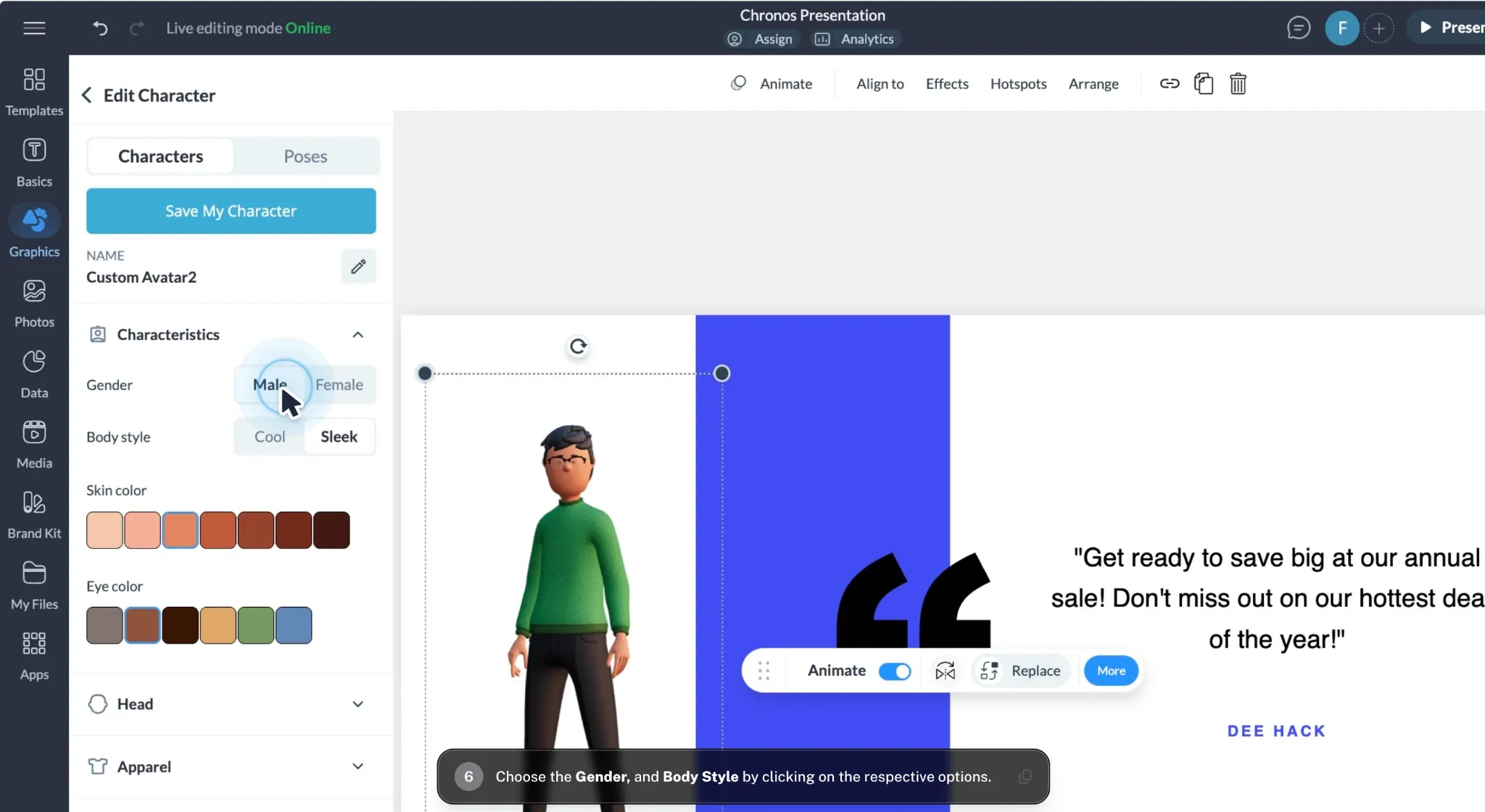
Visme lets you build a character from presets, choose poses or animations, and place the result directly into a presentation or video. It does not give you the underlying model.
Its character creator lets users customize prebuilt 3D characters, choose poses or animations, and place them directly into presentations, videos, social graphics, and other visual content. It exports GIF, MP4, HTML5, and PNG rather than an editable 3D model.
Main Features:
- Customizable 3D characters with selectable poses and preset animations.
- You build the character inside Visme and place it directly in presentations, videos, or social graphics.
- GIF, MP4, HTML5, and PNG output for publishing and embedding.
- Simple controls for creators who do not need a modeling package.
- You export the finished visual; you do not get the underlying 3D model.
Price
Visme has a free tier. Starter costs $12.25 per month per person when billed annually ($147 per year), and Pro costs $24.75 per month per person when billed annually ($297 per year). Enterprise pricing is custom.
Pros:
- Very easy for non-3D designers
- Useful animation presets
- Fits naturally into presentations and educational content
- No modeling knowledge required
Cons:
- Does not function as a true mesh-based anime character creator 3d tool
- Not suitable for Blender editing, VRM, or game-engine asset export
- Preset character animation is different from exporting a rigged 3D character
Best For
Presentation creators, educators, and marketers who need animated characters inside content rather than standalone 3D assets.
7. Meshy AI: Best for General 3D Assets, Rigging and Game Projects
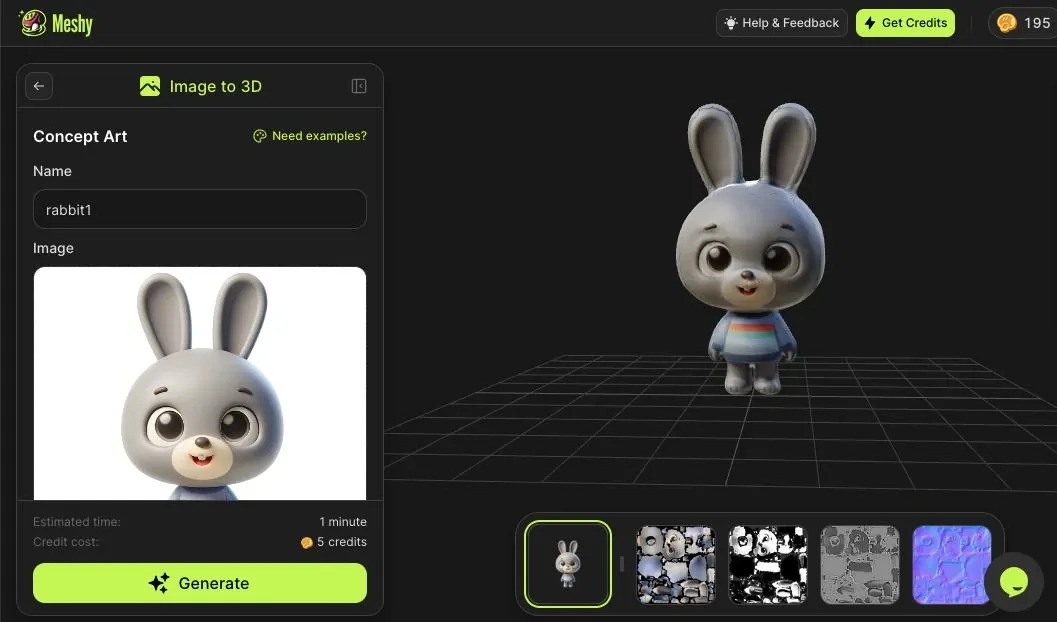
Meshy AI is a broader AI 3D platform aimed at asset creation.
Meshy's Image-to-3D tools can turn photos, sketches, concept art, or AI-generated images into 3D models. Meshy supports GLB, FBX, OBJ, STL, USDZ, and BLEND export, and its Auto Rigging and Animation tools prepare generated or uploaded characters for Unity, Unreal, Blender, and other animation software.
Main Features:
- Image-to-3D, text-to-3D, and multi-view generation for characters, props, and other assets.
- Texturing and remeshing tools for adjusting the generated asset before export.
- Auto-rigging and animation presets for moving generated characters into production.
- GLB, FBX, OBJ, STL, USDZ, and BLEND export for Blender, Unity, Unreal, and related tools.
- STL and 3MF support for creators who also need a route into 3D printing.
Price and Free Access
Meshy's Free plan provides 100 credits per month. Pro costs $20 per month, Premium costs $40 per month, and Ultra costs $100 per month. Meshy advertises 20% off annual billing, which works out to approximately $192 per year for Pro, $384 per year for Premium, and $960 per year for Ultra before promotions. Free users receive limited downloads for eligible Meshy 6 Lite models; free-plan assets use a CC BY 4.0 license and require attribution for commercial use.
Pros:
- Works for characters, props, and other 3D assets
- Native auto-rigging and animation tools
- Strong Blender, Unity, and Unreal compatibility
- Suitable for characters as well as props and other assets
- Free plan is useful for experimentation
Cons:
- Broader scope means less specific focus on anime characters
- Free export is limited by model/version and monthly allowance
- Production-ready assets may still require cleanup or retopology
Best For
Game developers and general 3D creators who want an AI platform that extends beyond character generation into rigging, animation, game assets, and 3D printing.
How to Create a 3D Anime Character With AI
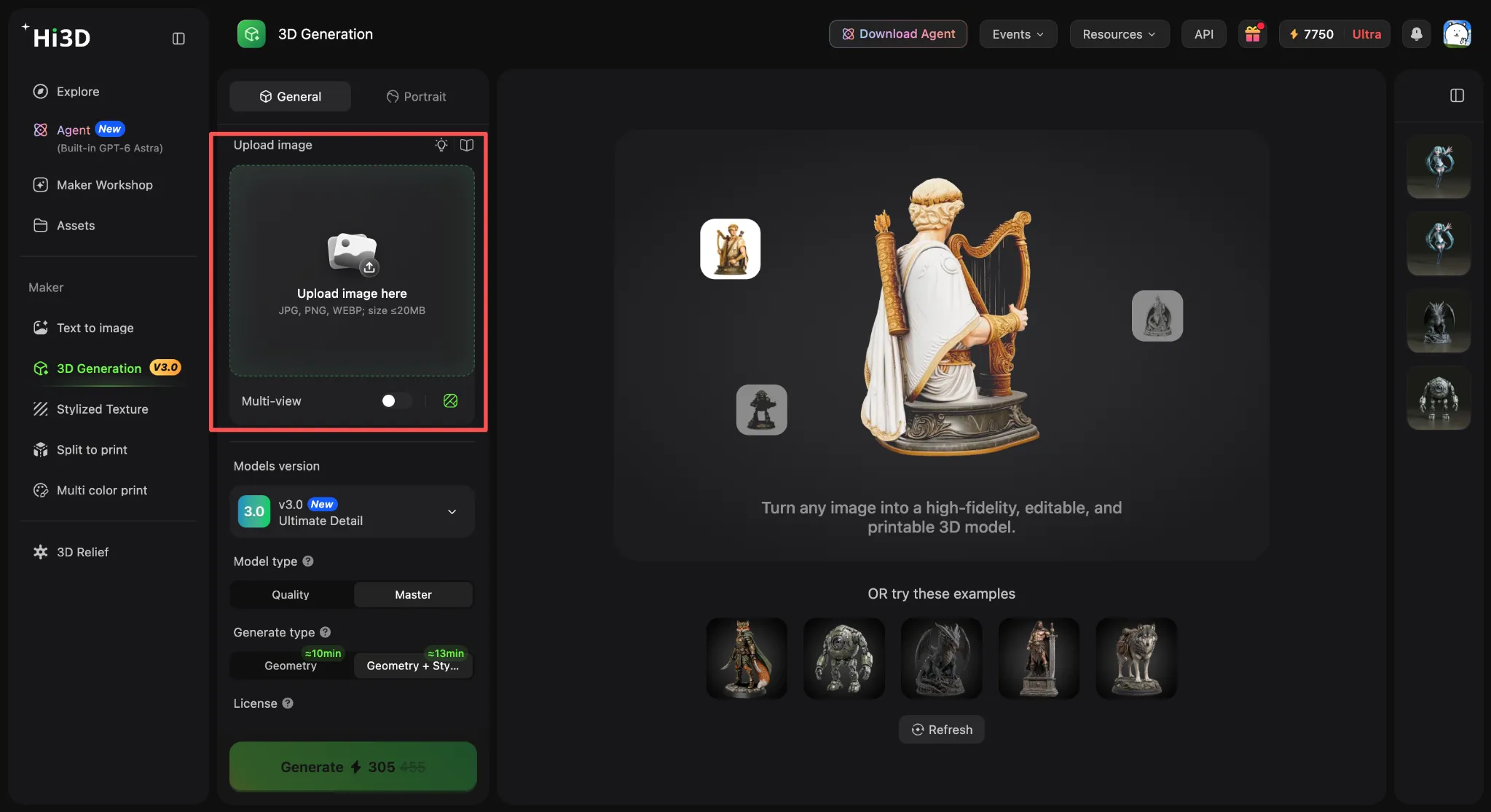
You do not have to sculpt every surface by hand for a first pass. The basic Hi3D process is simple: upload an image, set the generation parameters, and download the model.
Step 1: Upload the Image
Open the Hi3D 3D Generation workspace and upload a clear anime illustration.
For better results:
- Use a full-body image where possible.
- Keep the silhouette clear.
- Avoid unnecessary background clutter.
- Minimize extreme occlusion.
- Use multiple views when accurate back-side geometry matters.
A good source image gives the 3d anime character creator more visual information to interpret.
Step 2: Choose the Generation Parameters
For our test, we selected V3.0 Master. Choose the model and resolution that fit the detail level you need, then start the generation.
After generation, rotate the model once and check the face, hair, hands, clothing edges, and areas hidden in the original image.
The Hi3D V3.0 Master model used in our hands-on anime test.
Rotate the model before judging it. Anything hidden in the source image has been inferred rather than reconstructed from visible reference data.
Step 3: Download the Model
Once the model looks acceptable, select the export format that fits what you plan to do and download it.
In our test interface, Hi3D offered:
GLB, OBJ, STL, FBX, USDZ, 3MF White Model, 3MF Textured
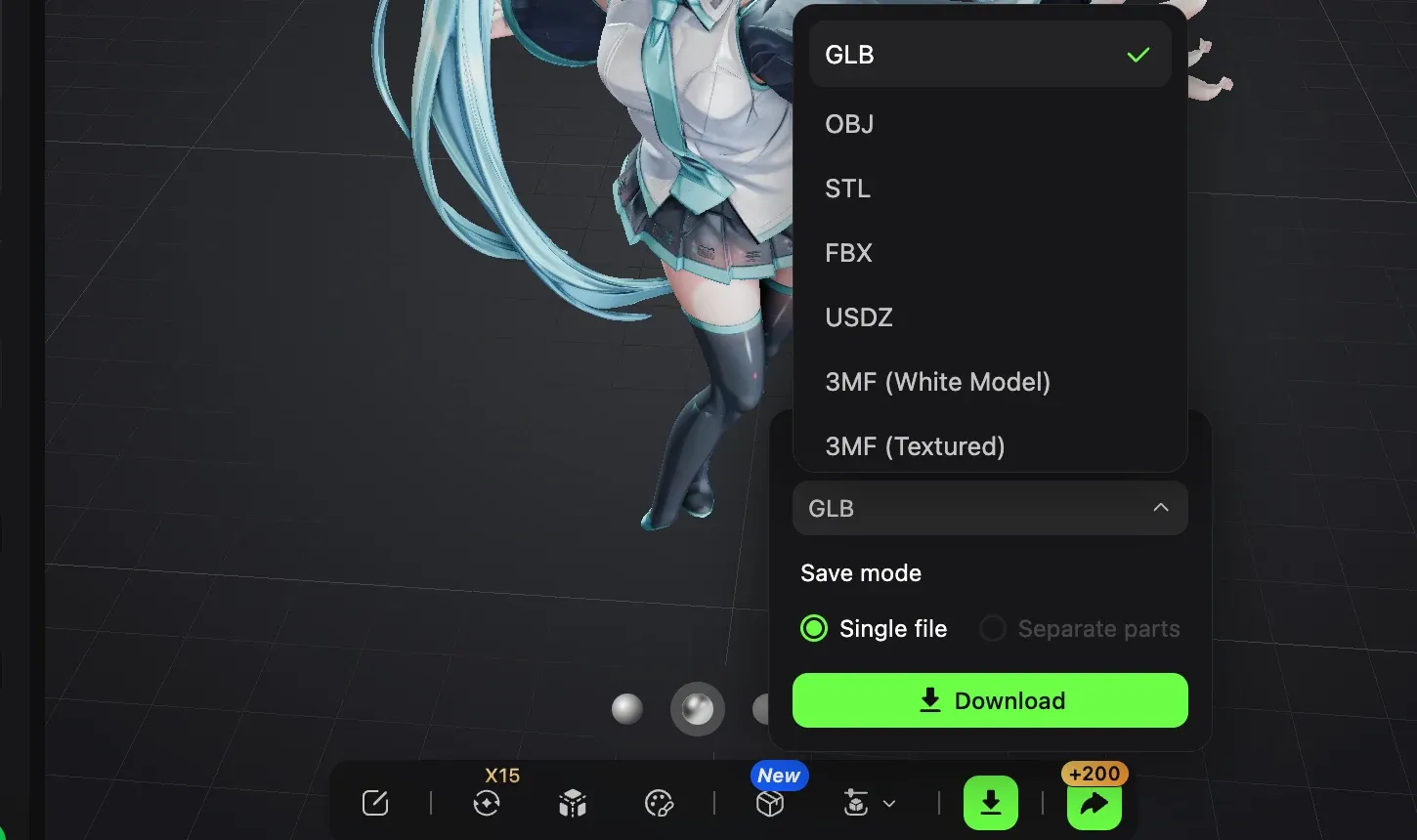
Export options available for the generated anime character.
For Blender and general 3D editing, GLB, FBX, or OBJ are common choices. STL and 3MF are more relevant to printing.
Frequently Asked Questions
What is the best 3D anime character creator?
For image-to-mesh work, Hi3D is the practical pick here, especially when printing is part of the plan. VRoid suits hand-built anime avatars. Meshy is the better match when rigging and animation matter as much as generation.
Can I export the model to Blender?
Yes. For Blender, prioritize GLB, FBX, OBJ, or native BLEND export. Hi3D, Meshy, 3D AI Studio, and Avaturn all give you usable model formats; Canva and Visme only export visual assets.
Which tools support VRM or VTuber models?
VRoid Studio is the clear choice for native VRM because it supports VRM 0.0 and VRM 1.0 export, with a VRChat-compatible path as well. Avaturn supports VTubing-oriented facial features such as blendshapes and visemes, but exports GLB rather than VRM. Hi3D, Meshy, and 3D AI Studio do not offer native VRM as a core feature.
Are AI-generated 3D anime characters commercially usable?
It depends on the platform, plan, source image, and rights attached to the input. Hi3D states that output ownership and usage depend on the applicable subscription terms and that users remain responsible for third-party rights in their inputs. Meshy's free-plan models use CC BY 4.0 and require attribution, while paid private-license models have different terms. Canva allows commercial use of AI outputs subject to its AI terms, but it does not guarantee exclusivity. Always review the current license before using a generated character commercially.
Final Thoughts
The biggest mistake is choosing by the preview image instead of the file you get afterward. If the next step is Blender, rigging, or printing, check the geometry and export formats first. In our Hi3D test, the front view looked convincing, but the rear and overlapping clothing still needed inspection—the kind of issue a polished preview will not show you.
Starting with existing artwork can still save hours on the first sculpt. Just leave room for Blender cleanup before calling the model production-ready.